

On the morning of 1 August 2012, Knight Capital's order router started sending orders it was never meant to send. In about 45 minutes it made more than 4 million executions in 154 US stocks, built positions worth several billion dollars, and lost the firm more than $460 million. The detail that matters for anyone running a bot, even a small one, comes from the SEC's investigation. Before the market even opened, an internal system had sent 97 automated emails pointing at the problem, and nobody acted on them.
Ninety-seven warnings, and nobody acted on any of them. That's the difference between sending alerts and monitoring. Monitoring means checks that reach you quickly, somewhere you'll notice, when the bot stops doing what you think it's doing.
The short answer
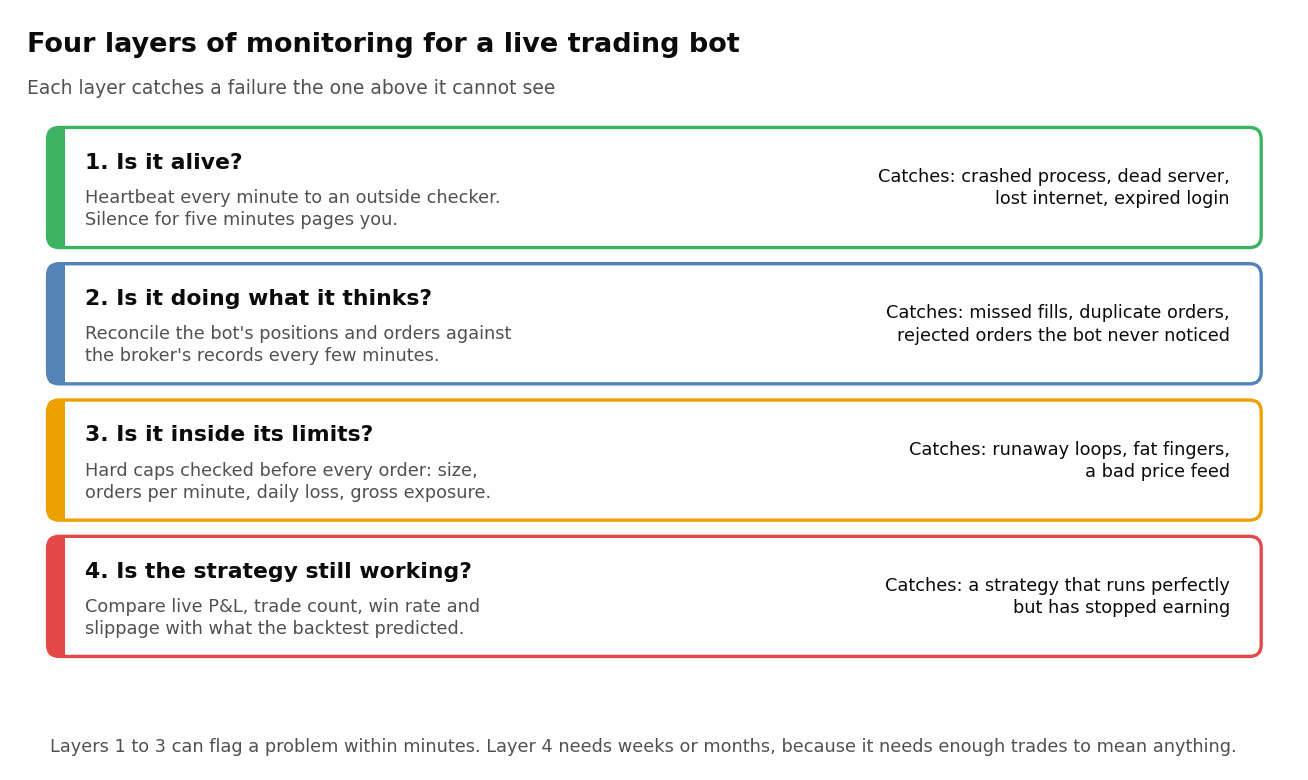
Monitor a trading bot at four levels. Is it alive (a heartbeat that an outside service checks)? Does it agree with the broker about positions and orders (reconciliation every few minutes)? Is it within hard limits on size, order rate and daily loss (checked in code before every order, with a kill switch)? And is the strategy still behaving like its backtest (live profit and loss, trade count and slippage compared with expectations)? Send alerts to your phone, keep them rare enough that you read every one, and make the first three checks automatic.
What actually went wrong at Knight?
It's worth getting the mechanism right, because every piece of it has a small-scale equivalent. The SEC's 2013 order describes three failures stacked on top of each other.
First, a deployment went wrong. New code was meant to go to eight servers, and a technician copied it to only seven. The eighth still carried old, unused code (a function called Power Peg, unused since 2003), and the new release had reused the flag that used to switch it on. Orders that reached the eighth server woke up a routine that kept sending child orders without checking whether the earlier ones had filled.
Second, the warnings weren't treated as warnings. The 97 emails weren't designed as alerts, and the people receiving them didn't usually read them. Third, the risk tools couldn't stop anything. Knight's main monitoring tool relied entirely on people watching a screen, raised no automated alerts and wasn't connected to order entry. When staff did react, they removed the new code from the seven healthy servers, which made those servers behave like the broken one. Knight later agreed to pay $12 million to settle SEC charges under the market access rule.
Your bot is almost certainly simpler than Knight's router. But "the code on the server isn't the code I think it is", "the warning went to an inbox nobody reads" and "there was no automatic brake" are the same ways small bots fail.
Layer 1: How do I know my bot is still running?
For a retail bot, the likelier failure is silence rather than a runaway loop. The process crashed at 2 a.m., the server rebooted for maintenance, the internet dropped, or the broker login expired. Zerodha's Kite Connect access tokens, for example, expire at 6 a.m. the next day as a regulatory requirement, and Interactive Brokers designs its TWS and IB Gateway software to be restarted daily. A bot that doesn't handle these events just sits there all day, doing nothing.
Why not have the bot email you when it fails? Because a crashed bot can't send anything. So the check has to run the other way round: your bot pings an outside service every minute, and the outside service alerts you when the pings stop. This is called a heartbeat, or a dead man's switch. Services such as Healthchecks.io work this way (their free tier covers 20 checks as of September 2026), and because the bot calls out to them, the bot's server doesn't need to accept any incoming connections.
A few details in that loop matter more than they look. The ping goes out only after a cycle has succeeded, and a cycle should count as a success only if the prices it used were fresh. A heartbeat sent from a loop that catches and ignores its own errors tells you the process is alive, not that it's trading (an expired login can fail every single cycle while the pings keep coming). The bot also logs in and tests itself well before the open, then waits, so a failed login surfaces while there's time to fix it. And the loop ends at the close, so something has to start it again the next morning, which our article on deploying a bot to a cloud server covers. Set the monitoring service's schedule to market hours too, or it'll page you (send the kind of alert that wakes you up) every evening when the pings stop on purpose.
In a real bot, separate the errors you expect from the ones you don't. Retry a timeout or a rate-limit error a few times, with a short pause, inside the cycle. Let unexpected errors, and anything to do with orders, stop the bot. And never resend an order just because the request timed out, because the broker may have accepted it. Check the order book first.
Set the grace period a little longer than your loop (say five minutes for a one-minute loop), and send the alert somewhere you'll see it within minutes: a phone push, a Telegram message or an SMS. Email is too easy to ignore, as Knight found. (UptimeRobot, another popular free service, works the opposite way: it polls a web address every five minutes. That suits a dashboard, but it means opening an inbound port on the bot's server, which a push-style heartbeat avoids.)
Layer 2: Does my bot agree with the broker?
Your bot keeps its own idea of what it holds, and the broker keeps the real one. The two drift apart more often than you'd think. An order gets rejected and the bot never reads the rejection. A partial fill is booked as a full one. A network timeout makes the bot resend an order that had already gone through. Or you place a trade from your phone and forget to tell it.
The fix is reconciliation, which just means comparing the two records. Every few minutes, pull positions and open orders from the broker and check them against the bot's internal state. If they still differ on a second check a few seconds later (fills in flight can cause a brief, harmless mismatch), stop placing new orders and alert. Don't let the bot "correct" the difference on its own, because a mismatch means something you didn't anticipate has happened, and that deserves a human look.
Most broker APIs also push order updates as they happen, either over a websocket (a connection that stays open so the broker can send messages instantly) or to a web address you register, called a postback URL. Use them, but treat them as a convenience rather than the source of truth, since a missed message is the very thing reconciliation exists to catch.
The standard defence against duplicate orders is to give every order your own label. Most broker APIs let you attach a short tag of your choosing to an order, so the bot can record the tag before sending and, after any timeout or restart, look for it in the day's orders before sending anything again.
Layer 3: What limits should a bot enforce on itself?
A bot needs to cap its own risk automatically, because no human watching a screen reacts in time to a loop sending ten orders a second. The brakes are a maximum order size, a maximum position per instrument and in total, a daily loss limit that halts trading, and a price sanity check. Enforce each in code before every order goes out:
- Maximum order size and position size, per instrument and in total.
- Maximum orders per minute. A normal strategy might send a handful, while a bug sends hundreds. Your broker has its own caps too (as of September 2026, Kite Connect limited accounts to 10 orders a second and 400 a minute), but you want yours to trip well before theirs. Staying under 10 a second also keeps a personal algo below the threshold at which, under the exchanges' standards for SEBI's framework, it would need to be registered through your broker.
- Maximum daily loss. When realised plus open losses cross it, cancel open orders, then flatten or freeze positions (decide which in advance), and stop.
- Price sanity. Reject any order priced far from the last traded price, which catches bad data feeds and mistyped parameters.
The daily-loss stop plus a single "halt everything" command make up your kill switch, and it's worth testing before you need it. Make the halt stick, too. When the kill switch trips, write it to a file with the date and have the bot check for it at startup, so an automatic restart can't quietly switch trading back on, and clear it by hand. It also shouldn't depend on the bot being healthy, since the bot is often the thing that's broken. Know how to cancel orders and square off from your broker's app or website, and try it once. Decide in advance which positions you'd close and how, too, because flattening thin options positions with market orders can itself be expensive. Exchanges have kill switches of their own (SEBI's 2025 retail algo framework describes the exchange's power to halt orders from a particular algo ID as a last line of defence), but that switch protects the market, not your account.
India has its own textbook case for pre-trade limits. According to the Securities Appellate Tribunal's later order, on 5 October 2012 a dealer at a Mumbai brokerage keyed in a basket order for 17 lakh Nifty units when the client wanted shares worth about ₹17 lakh. The resulting trades came to more than ₹650 crore, and the Nifty fell about 15% in seconds before a circuit breaker halted trading. It was a manual order, not a bot, but code that asks "is this order a hundred times bigger than anything I've sent before?" would have refused it.
Layer 4: Is my strategy still working?
This is the hardest layer, because nothing is broken. Fills are fine, limits are respected, the dashboard is green, and the bot looks healthy. Meanwhile the strategy has stopped earning. Markets change, edges decay, and a backtest that was partly luck drifts back towards zero.
So the practical question is whether a losing stretch is bad luck or a broken strategy, and that's a statistics question. Your backtest gives you an expected daily return and a volatility, and from those you can draw the range that live cumulative returns should be inside on any given day about 95% of the time (the expected path, plus or minus two standard deviations). Losses inside that range are consistent with the backtest. A move below it suggests something has changed.
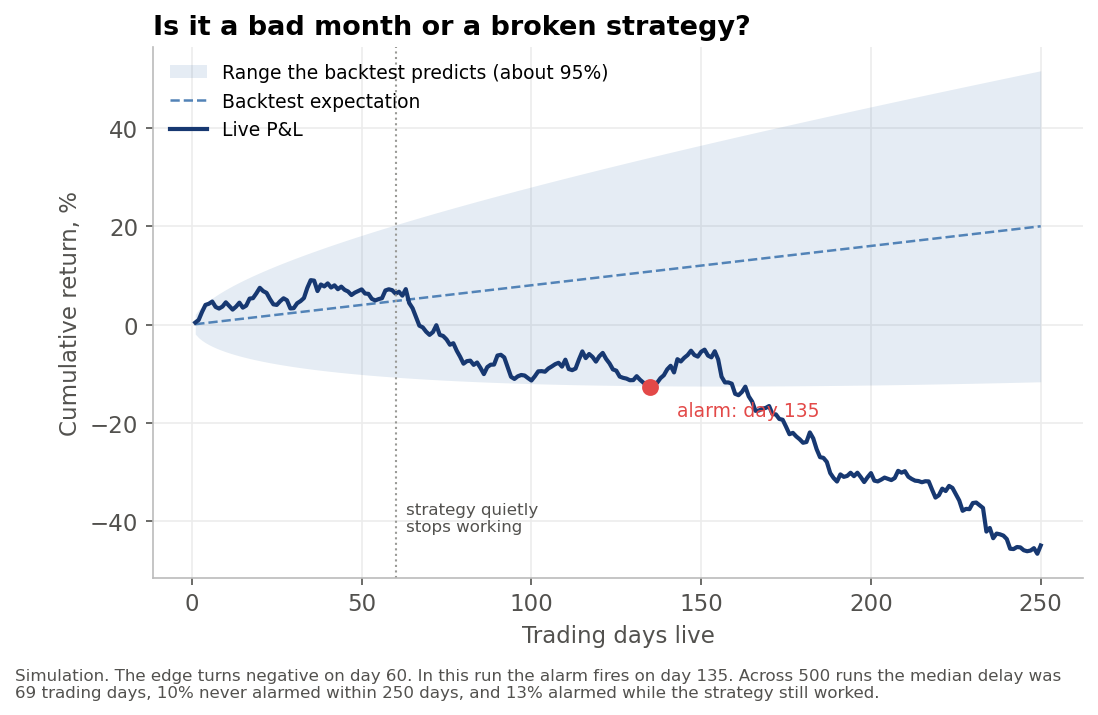
The chart shows the uncomfortable part. In our simulation the strategy goes from earning about 0.08% a day to losing about 0.2% a day on day 60, which is a sharp break. Even so, in this run the profit and loss didn't leave the band until day 135. Across 500 runs the median delay was 69 trading days, more than three months, and about one run in ten still hadn't crossed it when the simulation ended at day 250. There's a second catch. Because you look every day, a strategy that's working fine will sometimes dip below the band by luck: 13% of runs did so in the 60 days before the break. So treat a crossing as a reason to investigate and cut size, rather than an automatic verdict.
The simulation also makes life easy: a clean break on one day, well-behaved returns and a backtest volatility you can trust. Real decay is usually gradual, which makes it harder to spot. Two refinements help. Centre the band on a haircut of the backtest return (half is a common starting point), since backtests tend to be optimistic. And a sequential test designed for this job, such as a CUSUM chart, usually spots a break sooner at the same false-alarm rate, though still not quickly. That's why layer 4 can't replace the fast layers, and why position size matters so much: small positions buy you the time to find out.
Alongside profit and loss, track a few numbers that move faster. If a strategy that should trade 20 times a month but traded 3 times, it probably has a data or signal problem. If live slippage (the gap between the price when the signal fired and the fill price) runs at double what the backtest assumed, the backtest was optimistic, as our article on transaction costs explains. And win rate and average win and loss tend to drift before total profit does.
How should alerts reach me?
Rarely, and loudly. An alert channel that fires fifty times a day trains you to ignore it, which puts you back in Knight's position. A reasonable split is:
- Page-worthy (phone push or call): heartbeat missing, reconciliation mismatch, daily loss limit hit, kill switch triggered, login failed before the open.
- Daily summary (message or email): profit and loss, trades, slippage against the backtest, any warnings.
- Logs only: everything else.
If you use a Telegram bot for alerts, batch messages rather than sending one per tick. Telegram asks bots to avoid sending more than about one message a second in a single chat, and a burst of alerts during a real problem is when you'd hit that limit.
For those who want dashboards, open-source tools such as Prometheus and Grafana can chart everything above. They're useful, but a dashboard is something you have to look at, whereas the alerts are what find you.
Frequently asked questions
Can I monitor my trading bot from my phone?
Yes. Point your heartbeat service and your alerts at a phone push app, Telegram or SMS, and keep your broker's mobile app installed so you can cancel orders and square off by hand if the bot misbehaves.
How do I stop a trading bot that's out of control?
Build a kill switch before going live: a single command, plus an automatic trigger on a daily loss limit, that cancels open orders and blocks new ones. Because the bot itself may be what's broken, also know how to cancel and square off from your broker's app or website.
How often should I check my bot's positions against the broker?
Every few minutes during market hours, plus once before the open and once after the close. On any mismatch, stop new orders and alert, rather than letting the bot fix it on its own.
Do I need Grafana or a dashboard to monitor a bot?
No. Dashboards help with analysis, but the essentials are automated checks and a small number of alerts that reach your phone. Start there and add charts later.
Key points
- The likeliest failure for a small bot is silence, so a heartbeat to an outside service comes first.
- Reconcile with the broker every few minutes, and tag orders so a retry can't double a position.
- Enforce size, order-rate, daily-loss and price limits in code, and make a tripped kill switch survive a restart.
- Spotting a strategy that has stopped working takes weeks or months, so keep positions small enough to survive the wait.
A bot that runs unattended is only as safe as the checks around it. If you want to go deeper into execution, risk controls and taking strategies live, that's a core part of QuantInsti's EPAT programme, and Quantra's automated-trading courses cover the Python side step by step.
Sources: US SEC, In the Matter of Knight Capital Americas LLC, Release No. 34-70694, 16 October 2013. Securities Appellate Tribunal order, Emkay Global Financial Services vs SEBI, 26 August 2014. SEBI circular on safer participation of retail investors in algorithmic trading, 4 February 2025. Zerodha Kite Connect v3 documentation (user, websocket and exceptions pages), read September 2026. Interactive Brokers, daily and weekly reauthentication documentation. Telegram Bot FAQ. Healthchecks.io and UptimeRobot pricing and documentation pages, read September 2026. Drift chart: our simulation.
Interested in algorithmic trading?
Connect with an EPAT career counsellor to create a personalised quant career path for you