

TL;DR
This post shows you how to build a Python MCP server that translates plain English commands like “buy 10 shares of GOOG” into live orders on Interactive Brokers. We provide the full code and a step-by-step guide to build it yourself.
What you will get:
- A working Python script that connects to Interactive Brokers.
- An AI assistant that understands your trading commands.
- A practical example of how to use Large Language Models (LLMs) in trading.
The Problem with Manual Trading
Manual trading is slow, error-prone, and emotionally draining. You’re constantly switching between charts, news, and order entry windows. What if you could just write in plain English what you want to do, and have it executed accordingly?
This is where an AI-powered trading assistant comes in. We combine Large Language Models (LLMs) with a trading API like Interactive Brokers to create a system that understands your commands and executes them with precision.
Introducing the IB MCP Server
The Model Context Protocol (MCP) is an open standard that allows applications to interact with Large Language Models (LLMs) through a structured and transparent interface. Instead of relying solely on free-form prompts,
MCP lets applications expose specific tools and data sources to an LLM such as functions for placing trades, fetching market data, or retrieving account information. This ensures the model understands exactly what operations are available and how to request or return information in predictable formats like JSON.
In a trading environment, MCP acts as the bridge between your natural-language instructions and the actionable commands your broker API can execute. When you type something like “Buy 10 shares of AAPL,” the MCP server prompts the LLM and receives a precise, structured action containing the symbol, quantity, and order type.
This approach makes AI-driven trading assistants both intuitive and reliable, allowing you to build systems that are conversational yet deterministic, inspectable, and safe for real execution.
Our Python-based Model Context Protocol (MCP) server is a single script that connects to your Interactive Brokers account and uses Google’s Gemini API to interpret your natural-language commands.
Once you run the MCP server, you can ask your questions:
The image below shows the AI trading assistant running in a command-line terminal, where you can type commands in plain English. It captures a user asking a question and receiving a direct, informative answer from the server. This demonstrates the simple and conversational way you can interact with your trading account.

The image below shows a real order placed by our AI assistant, appearing directly in the Interactive Brokers Trader Workstation (TWS). This provides visual confirmation that your natural language command was successfully executed.

How It Works: A High-Level View
The architecture is simple and effective:
- You type a command: “What’s my account balance?” or “Sell 5 shares of TSLA.”
- The Python server listens: It captures your command.
- Context is added: The server gathers your current account information (balance, positions, etc.).
- The LLM is prompted: Your command and account context are sent to the Gemini API.
- Structured data is returned: The LLM responds with a JSON object detailing the action to take (e.g., place_order, get_data).
- The server executes: The server parses the JSON and executes the command through the Interactive Brokers API.
- Handling errors: Be careful, you’ll need for fail-safes to validate the LLM's JSON output before attempting execution to prevent errors or unexpected trades.
- Secure Credentials: The server handles live trading credentials (Interactive Brokers API keys) and connects to a public LLM API. Securing this info into an “.env” is necessary. These are environment variables (e.g., Python's os.environ).
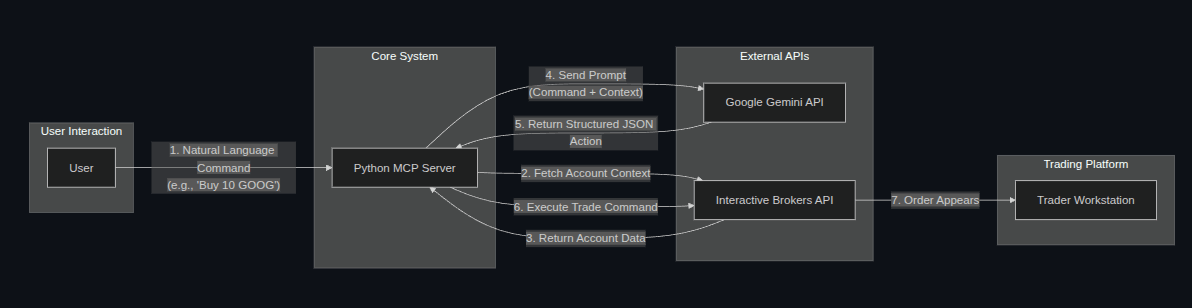
The below diagram above illustrates the high-level architecture of our AI trading assistant. It begins with the User interacting with the Python MCP Server by issuing natural language commands.
The server then fetches the necessary Account Context from the Interactive Brokers API and combines it with the user's command to create a prompt for the Google Gemini API (LLM).
The LLM processes this prompt and returns a Structured JSON Action, which the server then executes through the Interactive Brokers API, ultimately resulting in an order appearing in the Trader Workstation (TWS).
At the heart of the server is the connection to the Gemini API. The following code snippet highlights the exact moment where the server sends your command and the account context to the LLM and receives a structured JSON response.

Getting Started: The “How-To” Guide
We believe in learning by doing and have provided a practical how_to.md file that walks you through the entire process of building this server from scratch. It’s a conversation between a developer and an LLM, showing how to incrementally add features like:
- Establishing the initial API connection.
- Answering simple questions about your account.
- Placing market and limit orders.
- Handling errors and ambiguous commands.
- Fetching live market data.
This approach helps you understand the “why” behind the code, not just the “what.”
To give you a feel for the learning experience, here’s a glimpse of the conversational format you’ll find in the how_to.md guide.

Using the Example: The “README” File
If you want to jump right in and see the server in action, our README.md file has you covered. It provides a clear, step-by-step guide to get the server running in minutes:
- Prerequisites: What you need to have installed.
- Cloning the repository: Getting the code on your machine.
- Installation: Setting up the necessary Python libraries.
- Configuration: Setting up your API keys.
- Launching the server: Running the script.
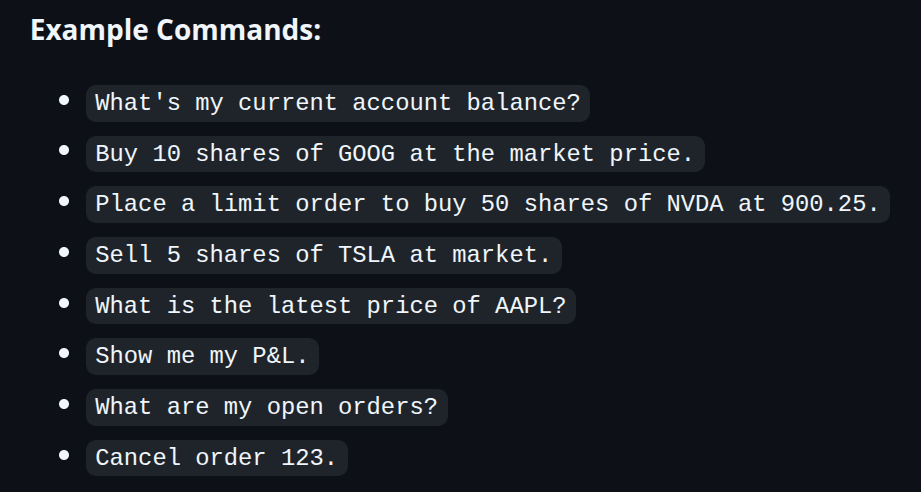
- Example commands: A list of commands you can try right away.
The README.md includes a list of ready-to-use commands so you can start interacting with your AI assistant immediately. Here’s a preview:
Why This is Better
This section highlights the unique advantages of our approach. The screenshot below, taken directly from ib_mcp_server.py, reveals the detailed prompt context sent to the LLM. This transparency, by sharing the whole code source, allows you to see exactly how your natural language commands are interpreted and processed.
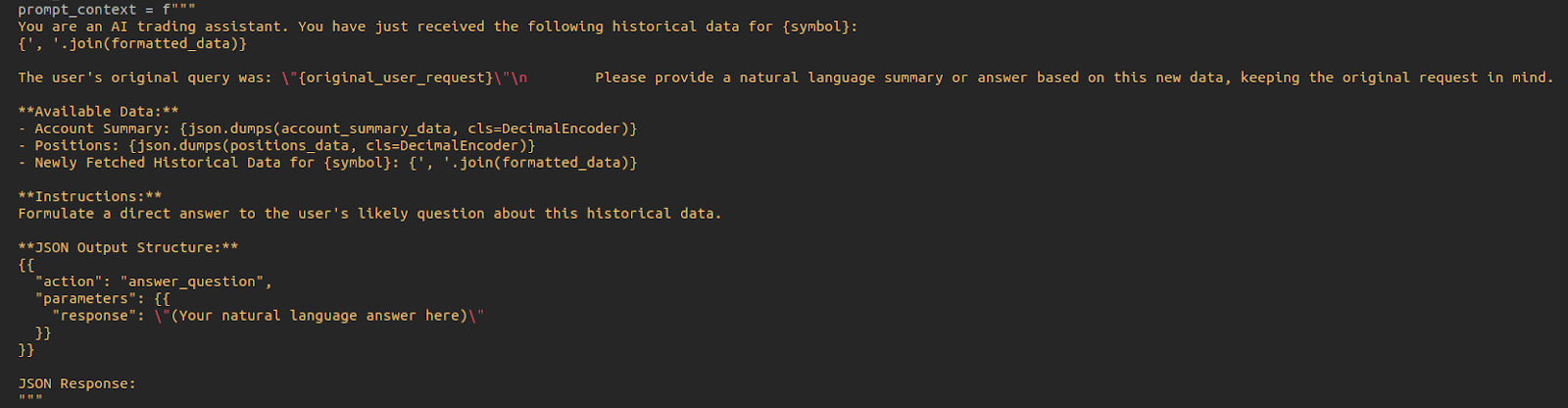
The following features make our application stand out from typical trading bots and MCP platforms.
- It’s yours: You have the full source code. You can modify, extend, and learn from it.
- It’s transparent: You can see exactly how the LLM is prompted and how it responds.
- It’s a learning tool: The how_to.md file is designed to teach you how to build similar applications.
Next Steps
The journey doesn’t end here. The screenshot below, showing the execute_decision function in ib_mcp_server.py, illustrates how easily you can extend the server’s capabilities by adding new action handlers. This function acts as a clear roadmap for integrating new features and expanding your AI assistant.
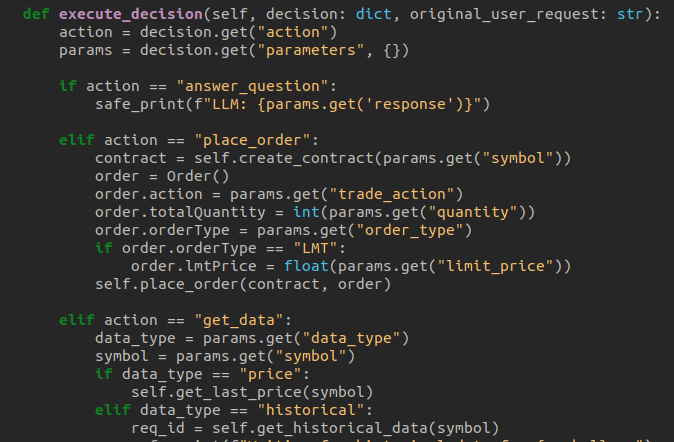
We encourage you to experiment with the code. Here are a few ideas:
- Tweak the prompts: Modify the system prompt in ib_mcp_server.py to handle more complex order types.
- An MCP server for another Broker: Upload this server to an LLM and modify the how_to prompts such that you create an MCP server for another broker.
- Add new capabilities: Extend the server to handle new commands, like closing a position or modifying an existing order.
- Integrate with other services: Connect the server to a news API or a charting library.
Conclusion
This project is more than just an MCP server for trading purposes. It’s a practical, hands-on guide to using LLMs in trading. It’s a starting point for building your own customized trading tools.
Ready to get started?
Clone the repository on GitHub and start building your AI trading assistant today.
Do not forget that, in case you want to create an ML strategy, you can learn how to do it with our course on AI for trading basics and you can also learn about deep learning models in our course on AI for trading advanced.
Connect with an EPAT career counsellor to learn how to leverage your AI and LLM integration skills for a professional quantitative trading career.
Disclaimer: This project is for educational and illustrative purposes only. Trading in financial markets involves substantial risk of loss. The code and concepts discussed here are not financial advice. Always exercise caution and thoroughly understand any automated trading system before deploying it in a live environment.