

A laptop is a poor home for a trading bot. It sleeps when the lid closes, installs updates when it feels like it, drops Wi-Fi and travels with you. Plenty of bots that "worked fine in testing" have missed a day of trades for one of those reasons, with nothing wrong in the strategy at all.
A small cloud server fixes most of that for about the price of a coffee a week. But moving a bot to the cloud brings traps of its own, and a few of them (time zones, static IPs, daily logins) are specific to trading.
What does a sensible setup look like?
A small Linux server in an Indian region, a static IP whitelisted with your broker, the clock and schedule set to IST, the bot run as a supervised service that restarts after a crash, a daily routine to refresh the broker login, and alerts when something breaks. For a retail bot trading through an Indian broker, the essentials are:
1) Rent a small Linux virtual machine in a region near your broker, such as AWS Mumbai or Hyderabad.
2) Give it a fixed public IP address and register that address with your broker for API order placement.
3) Lock it down, with SSH (secure remote login) by key only, from your own IP only.
4) Install the bot in a Python virtual environment, with API keys kept out of the code.
5) Run it as a service that restarts on failure and starts again each trading morning.
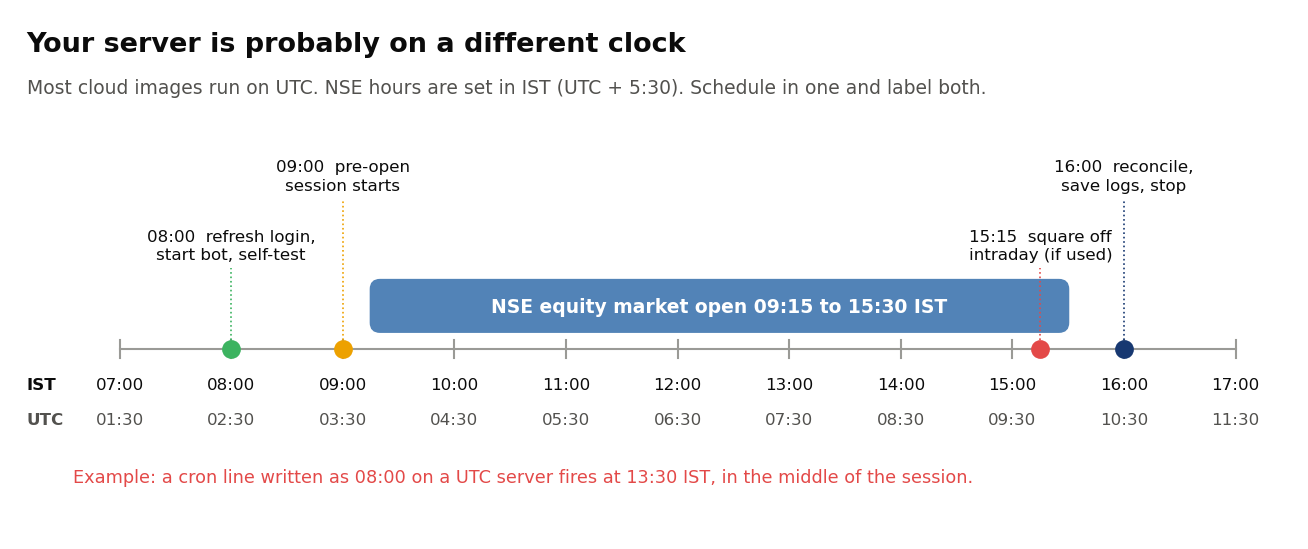
6) Schedule everything in IST, since most cloud servers run on UTC.
7) Add an outside heartbeat check, then test a reboot, a crash and an expired login before trading real money.
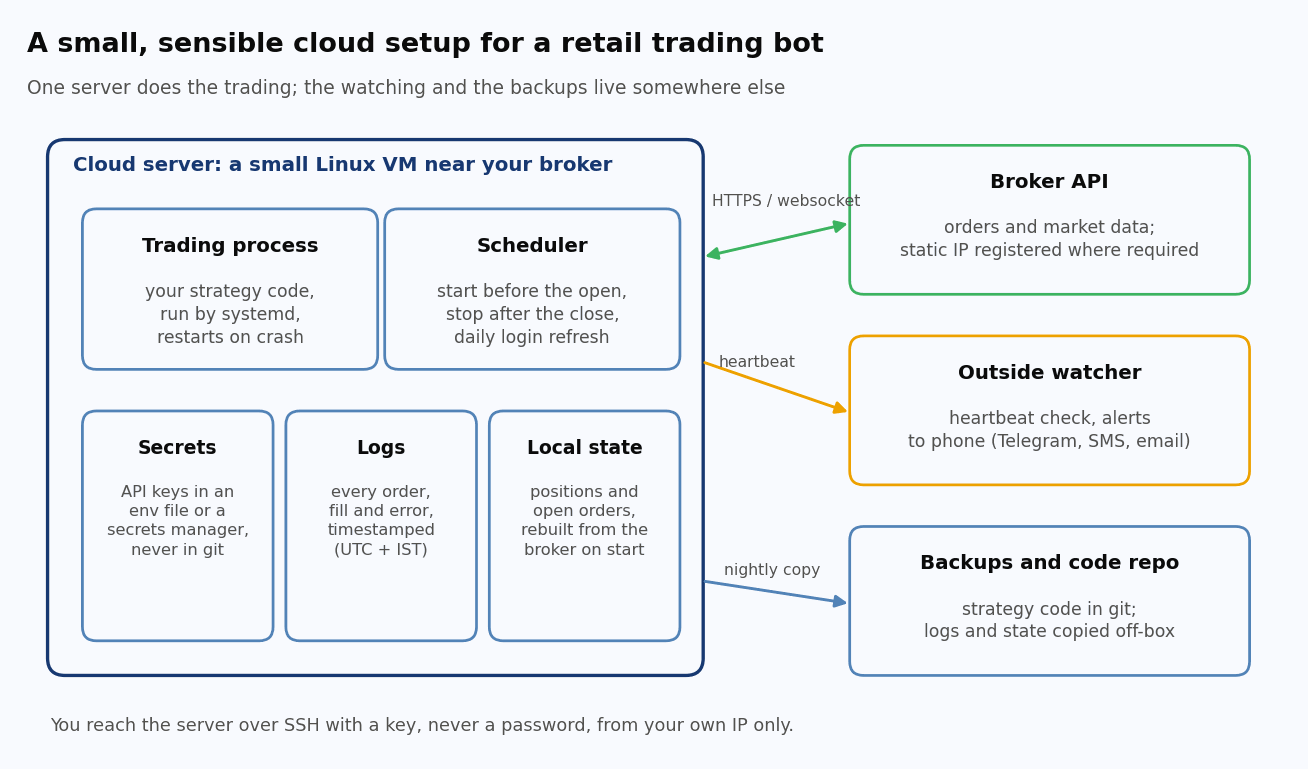
The layout above keeps the pieces that watch the bot, and the copies of its code and logs, off the bot's own server. That way they still work on the day the server doesn't.
Which cloud provider and server size should I choose?
For a single retail bot, almost any mainstream provider will do, and the smallest instance sizes are usually enough. A bot that waits on a live price feed and makes a decision every minute uses very little CPU. Memory matters more if you load large datasets or machine-learning models.
As a guide to prices (on-demand, Linux, as published in late September 2026; prices change often, so check the provider's page):
Option | Size | Price |
AWS EC2 t4g.micro, Mumbai or Hyderabad | 2 vCPU (ARM), 1 GB | about $0.0056 an hour, roughly $4 a month |
AWS EC2 t3.small, Mumbai or Hyderabad | 2 vCPU, 2 GB | about $0.0224 an hour, roughly $16 a month |
AWS public IPv4 address (including an Elastic IP) | per address | $0.005 an hour, about $3.65 a month |
Amazon Lightsail | 2 vCPU, 0.5 GB, static IP included | $5 a month |
DigitalOcean Basic droplet (Bangalore region available) | 1 vCPU, 512 MB | $4 a month |
Two things in that table catch people out. On EC2, the public IP address costs about as much as the smallest server itself. And the free tiers are less generous than their reputation. AWS now gives new accounts up to $200 of credits for six months, and Google Cloud's always-free VM runs only in US regions, which puts your bot on the wrong continent for an Indian broker.
Pick a region close to your broker's API servers, which for NSE brokers means Mumbai or another Indian region. Microseconds don't matter here, since retail broker APIs aren't built for latency-sensitive trading (we haven't measured the difference between Indian regions ourselves, and for a strategy that trades every few minutes it's unlikely to matter). The reason to stay close is simpler: a server on another continent adds delay and one more thing to go wrong.
Why does the static IP matter?
Under SEBI's retail algo framework, fully applicable to brokers since 1 April 2026, brokers may give API access only through a client-specific API key and a static IP address that the broker has whitelisted. Zerodha, for example, has required a static IP for API order placement since that date, while its market-data and positions APIs still work from any address. You can register a primary and an optional secondary IP, and exchange rules allow one change per calendar week. Other brokers have similar rules, so check yours.
In practice your server needs a public IP that doesn't change. On AWS, a normal EC2 public address changes every time you stop and start the instance, so it won't do. Allocate an Elastic IP (AWS's name for a fixed address you own until you release it) and attach it instead. Lightsail's static IPs and DigitalOcean's reserved IPs serve the same purpose. Because the registered address can only change once a week, keep the same IP when you rebuild or move a server, and re-attach it rather than allocating a new one. A secondary IP (a second server, or a home connection with a fixed address) makes a sensible fallback.
How do I set up the server?
On a fresh Ubuntu LTS server, the core steps are: create a non-root user, lock down SSH and the firewall, install Python and your bot's dependencies, pull your code, store broker keys as environment variables rather than in the code, and run a test before going live. They're much the same on any provider:
Secure the cloud account first. Turn on multi-factor sign-in for the provider account and set a billing alert. A stolen cloud login is worse than a stolen server key, because it gives away every server at once.
Lock down access to the server. Log in with an SSH key, never a password, and disable password logins. Open inbound SSH (port 22) only to your own IP address in the provider's firewall or security group. A trading bot doesn't need any other inbound ports, because it connects out to the broker and the heartbeat service rather than the other way round. If your home IP changes (many Indian connections do), update the rule, or use the provider's browser-based console as a fallback so you're never locked out.
Create a normal user for the bot. Don't run it as root. A separate user with access only to the bot's folder limits the damage if something goes wrong.
Install your code in a virtual environment. Clone the strategy from your git repository and create a Python virtual environment (a private set of libraries for this one project). Install pinned versions of your dependencies, because an unplanned library upgrade is a classic way for a bot that worked on Friday to fail on Monday.
Why does the server's time zone matter?
Amazon's documentation is explicit that EC2 instances run on UTC by default, and most other providers' images do the same. The NSE's hours are set in IST, which is UTC plus 5:30, with no daylight saving. So a schedule that looks right can fire at the wrong time, because the server reads its clock in UTC. A cron job (a line in Linux's built-in scheduler) written for "09:15" on a UTC server fires at 14:45 IST, forty-five minutes before the equity closes.
Check the clock is accurate as well. Cloud servers normally sync time automatically (AWS provides a time service that recent Amazon Linux uses by default through chrony, and on Ubuntu you can install chrony and point it at the provider's time source). A clock that drifts by a few seconds skews the bot's view of the open and the close.
How do I keep the bot running?
Run it as a systemd service rather than in a terminal you leave open. systemd is the program Linux uses to start and supervise background services, and it can start the bot at boot and restart it after a crash, but only if you ask, since by default it doesn't restart anything.
What about the daily login?
Indian broker API sessions don't last forever. Kite Connect tokens, for instance, are only valid until early the next morning, and SEBI's framework requires two-factor authentication for API access, so the bot needs a fresh session every trading day.
Schedule the login well before the open, say 8 a.m. IST, and follow your broker's approved login flow. Read your broker's terms before automating any part of it, since some prohibit that. If automation is allowed, remember that a password and a two-factor secret stored together on the server mean anyone who gets into the server gets into your trading account. Whatever the method, have the bot run a self-test after logging in (fetch a quote, read positions, confirm they match what it expects) and alert you if any step fails. Caught at 8 a.m., a failed login costs ten minutes. Found at 11, it costs the morning's trades.
What should I test before trading real money?
Break things on purpose while the stakes are zero. Run the bot in paper mode or at the smallest live size, then confirm it reconnects after a dropped network, refreshes an expired login, survives a reboot, rejects an order that fails a risk check, and reconciles its positions against the broker. Check each of these:
- Reboot the server mid-session. Does the bot come back, rebuild its positions from the broker rather than its own memory, and carry on without duplicating orders?
- Kill the process hard (sudo kill -9 with the bot's process ID, or make it exit with an error). Does systemd restart it? Then stop it for good with systemctl stop and check that your heartbeat alert fires.
- Expire the login. Does the bot notice the error and alert you, or does it sit idle?
- Time out an order. In a test build, make the order call fail after the order has been sent. Does the bot find the order in the broker's order book instead of sending a second one?
- Cut the network for a few minutes. Does it reconnect, and does it handle orders that changed while it was away?
- Check the clock. Does the first action of the day happen at the IST time you intended?
- Trigger the kill switch. Does it cancel open orders and stop new ones?
If any of these surprises you, good: you found it before it cost anything.
Frequently asked questions
What's the cheapest way to run a trading bot in the cloud?
A small Linux instance in an Indian region, which cost about $4 to $5 a month at mainstream providers in September 2026, plus a static IP where it's charged separately (about $3.65 a month on AWS EC2). Free tiers exist but are time-limited or located in the US.
Do I need a static IP for algo trading in India?
For API order placement, generally yes. SEBI's framework requires API access through a static IP whitelisted by your broker, and Zerodha, for example, has required one since 1 April 2026. Use an Elastic IP or an equivalent fixed address from your cloud provider, not the default address, which can change.
Which AWS region is best for trading on NSE?
An Indian region: Mumbai (ap-south-1) or Hyderabad (ap-south-2), which were priced the same for common small instances in September 2026. The difference between them is unlikely to matter for retail strategies.
Is it safe to keep broker API keys on a cloud server?
It can be, with care. Allow SSH only by key and only from your own IP, and turn on multi-factor sign-in for the cloud account. Keep keys in a file only the bot's user can read (or in a secrets manager), never commit them to git, and rotate them if you think they've leaked.
How do I keep a Python trading bot running every day?
Run it as a systemd service with a restart policy, start it each trading morning with a timer, have it log in and self-test before the open, and add an outside heartbeat check so you're alerted if it stops.
Key points
- A small Linux server in an Indian region costs a few dollars a month and removes the laptop's failure modes.
- Under SEBI's framework your broker will generally want a static IP for API order placement, so use an Elastic IP or its equivalent and keep it.
- Most cloud servers run on UTC, so schedule in IST deliberately and use explicit time zones in code.
- Use systemd with a restart policy and a morning timer, rebuild state from the broker at startup, and let an outside heartbeat catch what systemd can't.
Getting a bot onto a server can be a weekend's work. Getting it to run reliably, day after day, is the part most traders underestimate, and it's the part QuantInsti's EPAT programme spends time on when it takes strategies from backtest to live deployment.
Sources: AWS EC2 on-demand pricing (publication date 25 September 2026), AWS VPC pricing, AWS Free Tier page, and AWS EC2 documentation on time zones and Amazon Time Sync, all read 28 September 2026. Amazon Lightsail, DigitalOcean and Google Cloud free-tier pricing pages, read 28 September 2026. Zerodha support article on static IPs and Kite Connect v3 documentation, read September 2026. SEBI circular on safer participation of retail investors in algorithmic trading, 4 February 2025, and timeline circular of 30 September 2025. systemd.service, systemd.timer and systemd-system.conf documentation.
Interested in algorithmic trading?
Connect with an EPAT career counsellor to create a personalised quant career path for you